







The image is blurred or out of focus
Solution
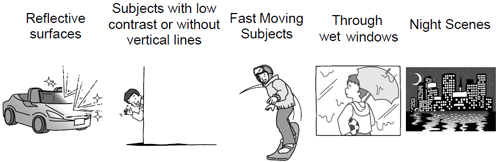
Autofocus may not work well on the following subjects. In such case, focus manually.
Adjust the zoom before you start the procedure.
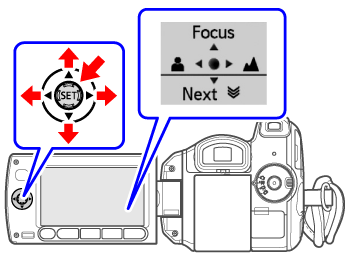
1. Press <  > to display the joystick guide.
> to display the joystick guide.- If [Focus] does not appear on the joystick guide, repeatedly push the joystick < > toward [Next] to display it.
> toward [Next] to display it.2. Push the joystick <  > toward [Focus].
> toward [Focus]."MF" appears.
3. Push the joystick <  > or <
  > once to verify if the image is focused.
> or < > once to verify if the image is focused.4. Adjust <  > the focus as necessary.
> the focus as necessary.5. Press < >.
>.- The focus will be locked.
- During focus lock, press < > and push the joystick < > toward [Focus] again to return the camcorder to autofocus.
> and push the joystick < > toward [Focus] again to return the camcorder to autofocus.