







How to play back recorded movies on EOS 7D
Solution
To play back movies on the camera, follow the procedures below.
1. Set the power switch to < ON > .
2. Press the <  > button to display the image.
> button to display the image.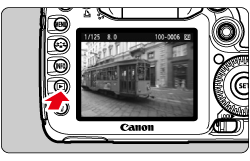
3. Turn the < Quick Control Dial > to select the image.
- During the single-image display, the <
 > icon displayed on the upper left indicates that it is a movie.
 - During the index display, the perforation on the left edge of the image indicates that it is a movie. Movies cannot be played on the index display, so press < SET > to switch to the single-image display.
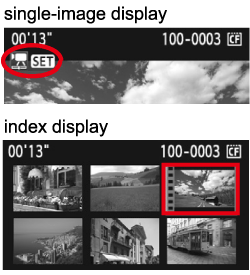
4. On the single-image display, press < SET > .
The movie playback panel will appear on the bottom.
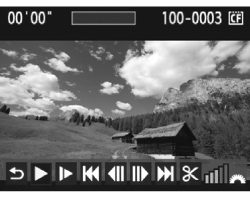
5. Turn the < Quick Control Dial > to select [  ] (play), then press < SET > . The movie will start playing.
] (play), then press < SET > . The movie will start playing.- You can pause the movie playback by pressing < SET > .
- During movie playback, you can adjust the sound volume by turning the < Main Dial > .
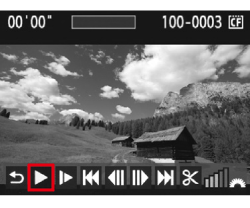
Items Related to Playback
| Icon | Function | Playback Description |
 |
Exit | Returns to the single-image display. |
|
Play | Pressing < SET > toggles between play and pause. |
 |
Slow motion | Adjust the slow motion speed by turning the < Quick Control Dial > . The slow-motion speed is indicated on the upper right. |
 |
First frame | Displays the movie's first frame. |
 |
Previous frame | Each time you press < SET > , a single previous frame is displayed. If you hold down < SET > , it will rewind the movie. |
 | Next frame | Each time you press < SET > , the movie will play frame-by-frame. If you hold down < SET > , it will fast forward the movie. |
 |
Last frame | Displays the movie's last scene. |
 |
Edit | Displays the editing screen. |
 |
Playback position | |
| mm' SS" | Playback time | |
 |
Volume | You can adjust the built-in speaker's sound volume by turning the < Main Dial > . |
NOTE
- Press the < INFO. > button to switch the shooting information display.
- If you took a still photo when you shot the movie, the still photo will be displayed for about 1 sec. during the movie playback.
- To edit a movie, use ZoomBrowser EX/ImageBrowser (provided software). For further information, please refer to the Related information.