







Changing the Aspect Ratio
Solution
You can change the width to height ratio of an image.
 | The same aspect ratio as HD TVs, used for displaying on wide-screen HD TVs. |
 | The same aspect ratio as 35mm film, used for printing out 5 x 7 in. or postcard sized images. |
 | The same aspect ratio as standard televisions, used for printing images on 3.5 x 5 in. to various A-sized papers. |
 | A square-shaped aspect ratio. |
NOTE
- The digital zoom is only available in ().
1. Press the <Power> button on the camera.
2. Press the <FUNC./SET> ( ) button.
) button.3. The following screen appears.
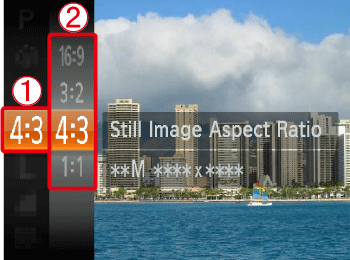
 Operate the <directional buttons> up or down to select [Still Image Aspect Ratio].
 Press the <FUNC./SET> button (), or the right <directional button> to display the list of aspect ratios.
Operate the <directional buttons> up or down to select an aspect ratio of your choice.
After making these settings, press the <FUNC./SET> () button.
) button.When the following shooting modes are selected, the aspect ratio cannot be changed, or limited aspect ratios are available.
 ... Cannot be set
 ... [4:3] or [16:9] can be selected
 ... This shooting mode is not available in this model
| Model | Shooting Modes | ||
|---|---|---|---|
 |  , ,  , ,  , ,  , ,  , ,  , ,  , ,  , ,  , ,  , ,  |  | |
| PowerShot ELPH 100 HS / IXUS 115 HS PowerShot ELPH 300 HS / IXUS 220 HS | | | |
| PowerShot SX230 HS PowerShot SX220 HS | | | |