







How to set Continuous Shooting
Solution
You can shoot continuously at a maximum speed of approximately 3.4 images/second (approximately 3.3 images/second for the PowerShot ELPH 510 HS / IXUS 1100 HS) while the shutter button is pressed fully and held.
IMPORTANT
- The following explanations are provided based on the assumption that the [Shooting Mode] is set to [Program] (
 ).
). - Cannot be used with the self-timer.
- Continuous shooting speed increases in [Low Light] (
 ) mode.
 - During continuous shooting, the focus position and exposure will be fixed at what they were when the shutter button was half-pressed.
- Depending on the shooting conditions, the camera settings and the zoom position, the camera may stop shooting momentarily, or the shooting speed may slow down.
- As the number of images increases, the shooting speed may slow down.
- If the flash fires, the shooting speed may slow down.
- In the following shooting modes, you cannot set the [Continuous] (
 ).
).
- [AUTO] ( ), [Movie Digest] (
 ), [Smart Shutter] (
 ), [Handheld NightScene] (
 ), [Long Shutter]* (
 ), [iFrame Movie] (
 ), [Super Slow Motion Movie] (
 )
)
), [Movie Digest] (), [Smart Shutter] (), [Handheld NightScene] (), [Long Shutter]* (), [iFrame Movie] (), [Super Slow Motion Movie] ()- When using the [Touch Shutter] function with the PowerShot ELPH 510 HS / IXUS 1100 HS, even if [Continuous Shooting] () mode is selected, only one shot will be taken. Please use the shutter button.
- The position and shape of the operation buttons, screens displayed, and setting items may differ according to the model you use.
1. Set the <Mode Switch> to [Shooting] ( ) and then press the <Power> button.
) and then press the <Power> button.2. Touch [FUNC.] ( ) on the lower-left hand side of the screen.
) on the lower-left hand side of the screen.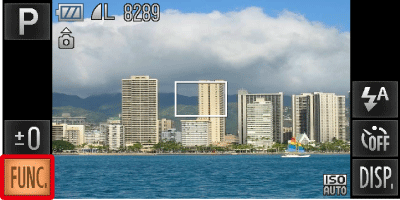
3. The following window appears.
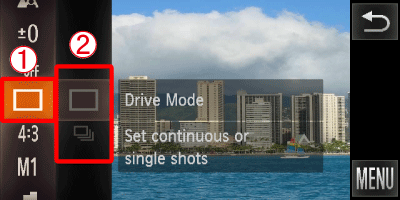
 Drag up or down the menu on the left to choose [Single Shot] (
 .
. Touch [Continuous] (
 ) from the menu in the right.
Touch [Continuous] () again to make the setting.
) again to make the setting.4. The following window appears.
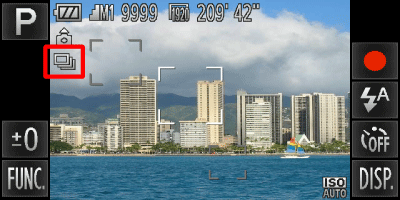
If the [Continuous] () icon is displayed on the upper-left part of the screen, the setting is completed.
) icon is displayed on the upper-left part of the screen, the setting is completed.As long as you hold the <shutter button> down, the camera will shoot successive images.
REFERENCE
- The PowerShot ELPH 510 HS / IXUS 1100 HS have the following three types of drive modes. Please select a mode according to the shooting scene.
| Drive Mode | Description |
|---|---|
| Continuous Shooting | The camera shoots continuously with the focus and exposure set when the shutter button is pressed halfway. |
 Continuous Shooting AF* Continuous Shooting AF* | The camera shoots continuously and focuses. The [AF Frame] is set to [Fixed frame]. The highest speed is approximately 0.8 images/second. |
 Continuous Shooting LV* Continuous Shooting LV* | The camera shoots
continuously with the focus fixed to the position set in manual focus. In ( ), the focus is locked on the first shot. The highest speed is approximately 0.9 images/second. ), the focus is locked on the first shot. The highest speed is approximately 0.9 images/second. |
) mode, [AF lock] ( ) or manual focus (
 ) modes, [Continuous Shooting AF] () will change to [Continuous Shooting LV] ().