







Shooting subjects up close (PowerShot G15 / PowerShot S110)
Solution
If you are shooting a subject at a close distance, and if the subject cannot be easily focused within the normal shooting range, switching the normal mode to the [Macro] ( ) mode will make it easier to focus on the subject.
) mode will make it easier to focus on the subject.IMPORTANT
- The following explanations are provided based on the assumption that the [Shooting Mode] is set to [Program] (
 ).
). - The edges of the image may darken if the flash fires.
1. Press the <Power> button on the camera.
2. Press the <Macro> () button.
) button.3. The following screen appears.
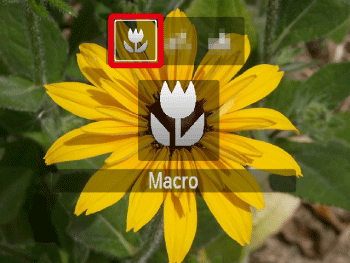
Operate the <directional buttons> left or right to set [Macro] ().
).If [Macro] () is indicated on the LCD Monitor, the camera is in [Macro] () mode.
) is indicated on the LCD Monitor, the camera is in [Macro] () mode.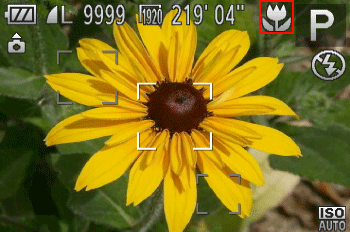
REFERENCE
- Try attaching the camera to a tripod and shooting in [Self-Timer] to prevent the camera from moving and blurring the image.
NOTE
Information for the PowerShot S110
You can also configure this setting by pressing the <Macro> ( ) button, touching ],and then touching it again.
) button, touching ],and then touching it again.The shooting distance for each [Focusing Range] is as shown in the following table (from the end of the lens). If you shoot beyond the following ranges, the subject may be out of focus.
Also, the [Focusing Range] cannot be set in some shooting modes. Please see the following table for details.
 ... Focusing Range cannot be set
| Model | Shooting distance | Shooting modes in which [Focusing Range] cannot be set | |
|---|---|---|---|
[Normal] 
| [Macro] 
|  , ,  , ,  , ,  , , 
| |
| 5 cm (2.0 in.) - infinity (W)* 40 cm (1.3 ft.) - infinity (T)** |
1cm - 50cm (0.4 in. - 1.6 ft.) (W)* | | |
| 5 cm (2.0 in.) - infinity(W)* 30 cm (1.0 ft.) - infinity (T)** |
3cm - 50cm (1.2 in. - 1.6 ft.) (W)* 30 cm - 50cm (1.0 ft. - 1.6 ft.) (T)** | |
|
 ) to the maximum wide angle side (Max. wide angle).
** (T): When turning the toward (
 ) to the maximum telephoto side (Max. telephoto).