







How do I set the ISO Speed (EOS 50D)?
Giải pháp
Set the ISO speed (image sensor's sensitivity to light) to suit the ambient light level.
ISO Speed Guide
| ISO Speed | Shooting Situation (No flash) | Flash Range |
| 100 - 200 | Sunny outdoors | The higher the ISO speed, the farther the flash range will be. |
| 400 - 800 | Overcast skies, evening | |
| 1600 - 3200, H1, H2 | Dark indoors or night |
CAUTION
- If [C.Fn II -3: Highlight tone priority] is set to [1: Enable], the settable ISO speed range will be ISO 200 - 3200.
- Using a high ISO speed or shooting in high-temperature conditions may result in more grainy images. Long exposures can also cause irregular colors in the image.
REFERENCE
With [C.Fn I -3: ISO expansion] set to [1: On], “H1” (equivalent to ISO 6400) and “H2” (equivalent to ISO 12800) can also be set.
1.Set the power switch to <ON>.
2. Press the <  > button.
> button.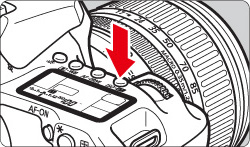
3.While looking at the LCD panel, turn the < Quick Control Dial >.
- It can be set within ISO 100-3200 in 1/3-stop increments.
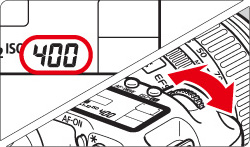
When “A” is selected, the ISO speed will be set automatically.
About “A” (Auto) ISO Speed
If the ISO speed is set to “A”, the actual ISO speed to be set will be displayed when you press the shutter button halfway. As indicated below, the ISO speed will be set automatically to suit the shooting mode.
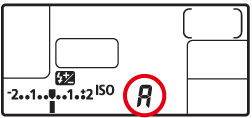
| Shooting Mode | ISO Speed Setting |
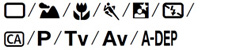 | ISO 100 - 1600 |
 | Fixed at ISO 100 |
 | Fixed at ISO 400 |
| With flash | Fixed at ISO 400(If fill flash results in overexposure, ISO 100 or a higher ISO will be set.) |