







How do I set the language on the camera?
Giải pháp
You can change the language displayed in the LCD monitor menus and messages.
1. Press the < Playback > ( ) button to turn on the camera.
) button to turn on the camera.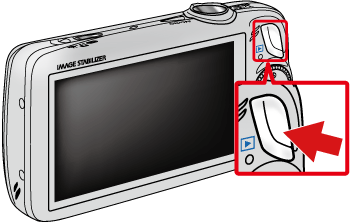
2. Hold down  the < FUNC./SET > (
 ) button, and press
  the < MENU > (
 ) button immediately.
the < FUNC./SET > () button, and press the < MENU > () button immediately.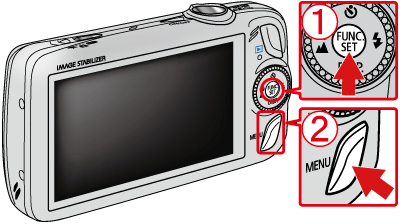
3. The following screen will appear on the LCD monitor.
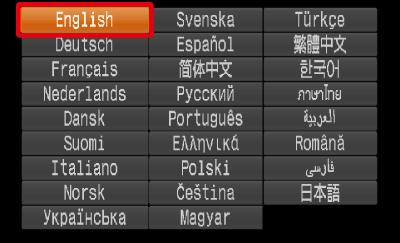
Operate the < Directional buttons > to select a target language.
After a language is selected, press the < FUNC./SET > () button.
) button.NOTE
- The clock will appear if too much time passes between pressing the < FUNC./SET > () button and the < MENU > () button in Step 2. If the clock appears, press the < FUNC./SET > () button to remove the clock and repeat Step 2.
- You can also change the display language by pressing the < MENU > () button, choosing the [Set up] (
 ) tab, and choosing the [Language] menu item.