







How to change Control Ring functions (PowerShot S95)
Giải pháp
You can change the functions assigned to the control ring so that these settings will be easier to operate.
NOTE
If the <Control Ring> settings are changed, the <Control dial> settings are changed as well.
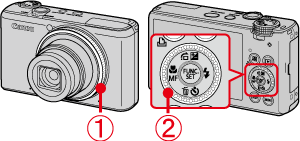
 <Control Ring>
 <Control dial>
1. Turn on the camera.
2. Press the <RING FUNC.> ( ) button.
) button.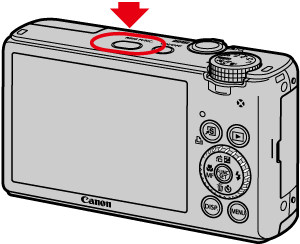
3. The following window appears.
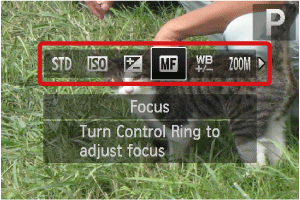
Press the <RING FUNC.> () button or operate the <directional buttons> left or right to choose an option.
) button or operate the <directional buttons> left or right to choose an option.After the selection is made, press the <FUNC./SET> ( ) button.
) button.4. The following window appears.
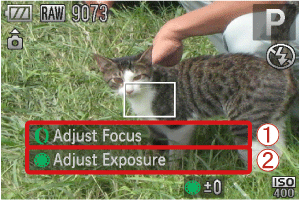 The function assigned to the <Control Ring> appears. The function assigned to the <Control dial> appears.
The functions you can assign to the control ring are different depending on the shooting mode.
| Assignable Function | Shooting mode | ||||
|---|---|---|---|---|---|
[Manual] | [Aperture Priority] | [Shutter Speed Priority] | [Program] | ||
[Default Control] | Control Ring | Av | Av | Tv | ISO |
| Control Dial | Tv | +/- | +/- | +/- | |
[ISO speed] | Control Ring | ISO | ISO | ISO | ISO |
| Control Dial | Av, Tv | Av, +/- | Tv, +/- | +/- | |
[+/- (Exp.) / Tv] | Control Ring | Tv | +/- | +/- | +/- |
| Control Dial | Av | Av | Tv | ISO | |
[Focus] | Control Ring | MF | MF | MF | MF |
| Control Dial | Av, Tv | Av, +/- | Tv, +/- | +/- | |
[White Balance] | Control Ring | You can correct the white balance. | |||
| Control Dial | |||||
[Step Zoom] | Control Ring | You can zoom using Step Zoom. | |||
| Control Dial | |||||
[i-Contrast] | Control Ring | You can set i-Contrast. | |||
| Control Dial | |||||
[Aspect ratio] | Control Ring | You can change the aspect ratio. | |||
| Control Dial | |||||
[Custom] | - | You can assign the functions you want. | |||
- Av: aperture value, Tv: shutter speed, ISO: ISO speed, +/-: exposure compensation, MF: manual focus
- With [White Balance] (
 ), [Step Zoom] (
 ), [i-Contrast] (
 ) and [Aspect ratio] (
 ) , the functions assignable to the <Control> dial are the same as with [ISO] (
 ).
).