Usable Paper
Giải pháp
The following shows the paper sizes that can be used with this printer.
| Paper Type | Setting for [Paper Type]*1 | Paper Size |
| Plain paper*2 (64 to 82 g/㎡) | [Plain Paper]*3 *4 (Default) | A4 |
| B5 | ||
| A5 | ||
| Legal | ||
| Letter | ||
| Executive | ||
| Statement | ||
| Foolscap | ||
| 16K | ||
| Custom Paper Size*5 | ||
| Plain paper*2 (60 to 69 g/㎡) | [Plain Paper L]*3 | A4 |
| B5 | ||
| A5 | ||
| Legal | ||
| Letter | ||
| Executive | ||
| Statement | ||
| Foolscap | ||
| 16K | ||
| Custom Paper Size*5 | ||
| Plain paper*2 (76 to 100 g/㎡) | [Plain Paper H]*4 *6 | A4 |
| B5 | ||
| A5 | ||
| Legal | ||
| Letter | ||
| Executive | ||
| Statement | ||
| Foolscap | ||
| 16K | ||
| Custom Paper Size*5 | ||
| Heavy paper (92 to 130 g/㎡) | [Heavy Paper 1]*6 | A4 |
| B5 | ||
| A5 | ||
| Legal | ||
| Letter | ||
| Executive | ||
| Statement | ||
| Foolscap | ||
| 16K | ||
| Custom Paper Size*5 | ||
| Heavy paper (131 to 163 g/㎡) | [Heavy Paper 2] | A4 |
| B5 | ||
| A5 | ||
| Legal | ||
| Letter | ||
| Executive | ||
| Statement | ||
| Foolscap | ||
| 16K | ||
| Custom Paper Size*5 | ||
| Transparency (black and white printing only) | [Transparency] | A4 |
| Letter | ||
| Label | [Labels] | A4 |
| Letter | ||
| 16K | ||
| Custom Paper Size*5 | ||
| Index Card | [Heavy Paper 2] | Index Card |
| Envelope | [Envelope] [Envelope H]*7 | Envelope Monarch |
| Envelope No. 10 (COM10) | ||
| Envelope DL | ||
| Envelope C5 | ||
| Envelope B5 | ||
| Coated paper (100 to 130 g/㎡) | [Coated Paper 1] | A4 |
| Letter | ||
| 16K | ||
| Custom Paper Size*5 | ||
| Coated paper (155 to 165 g/㎡) | [Coated Paper 2] | A4 |
| Letter | ||
| 16K | ||
| Custom Paper Size*5 | ||
| Coated paper (210 to 220 g/㎡) | [Coated Paper 3] | A4 |
| Letter | ||
| 16K | ||
| Custom Paper Size*5 |
*2 Recycled paper can be also used.
*3 If you want to print paper of 64 to 69 g/㎡, you can specify either of [Plain Paper] or [Plain Paper L].*8
*4 If you want to print paper of 76 to 82 g/㎡, you can specify either of [Plain Paper] or [Plain Paper H].*8
*5 You can load custom size paper that is 76.2 to 215.9 mm wide and 127.0 to 355.6 mm long.
*6 If you want to print paper of 92 to 100 g/㎡, you can specify either of [Plain Paper H] or [Heavy Paper 1].*8
*7 If you want to improve the toner fixation when printed with [Envelope] selected, select [Envelope H].
*8 If either setting causes the following problems and so on, specify the other setting to print.
- Output paper curls.
- Residual images appear on non-printed areas.
- The toner does not fix onto paper well, and the printing comes out faint.
IMPORTANT
About print speed
- The print speed may drop depending on the paper settings for the size, type, orientation, and number of copies.
- When printing paper whose width is less than 192 mm, the print speed drops.
Precautions for paper
- See "e-Manual" (HTML manual) in the CD-ROM supplied with the printer.
When using labels or envelopes
- Using the following types of paper may result in paper jams that are difficult to clear or may result in damage to the printer.
- Peeled labels or partly used labels
- Coated labels that are easily peeled off from the backing sheet
- Labels with uneven adhesive
- Envelopes with fasteners or snaps
- Envelopes with address windows
- Envelopes with adhesive on the surface
- Wrinkled or creased envelopes
- Poorly manufactured envelopes in which the glued parts are uneven
- Irregularly-shaped envelopes
NOTE
Printable area
- See "e-Manual" (HTML manual) in the CD-ROM supplied with the printer.
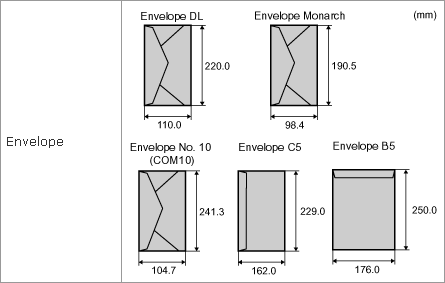
Envelope sizes
- The envelope sizes are as follows.