How do I use the Movie Digest function to shoot and to play back movies made with it? (PowerShot G1 X)
Giải pháp
You can make a short movie of a day just by taking still images.
Each time you take a picture, the scene just before taking your shot (about two to four seconds) will be automatically recorded as a movie. All the movies recorded on the same day will be saved as a single file.
IMPORTANT
- The position and shape of the operation buttons, screens displayed, and setting items may differ according to the model you use.
- Since you are also shooting movies when you shoot still images, the battery will be depleted more quickly than in [AUTO] (
 ) mode.
 - The image quality will be fixed at (
 ) for movies shot in [Movie Digest] (
 ) mode.
 - In the following cases, movies will be saved as separate files even if they were shot on the same day with [Movie Digest] () mode.
- If the clip file size reaches 4 GB or the recording time reaches approximately 1 hour
- If the movie is protected
- If a movie has been edited
- If the daylight saving time or time zone settings have been changed
- When a new folder is created
- If the copyright information is changed or deleted
1. Turn on the camera, then Set the <Mode Dial> to ( ).
).
).2. Press the <FUNC./SET> ( ) button.
) button.3. The following screen appears.
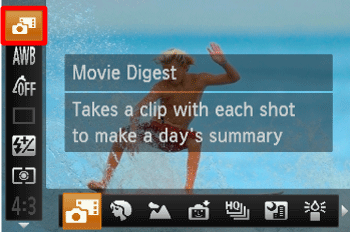
Operate the <directional button> up or down to select [Rec. Mode] (If no changes have been made so far, [Movie Digest] ( ) will be displayed).
) will be displayed).4. The following screen appears.
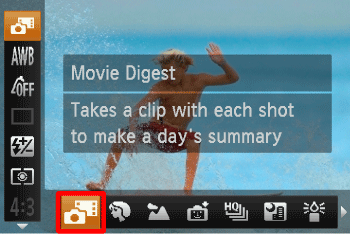
Operate the <directional button> left or right to select [Movie Digest] ().
).After the settings are completed, press the <FUNC./SET> () button.
) button.5. Shoot.
NOTE
- If you operate the camera while shooting a movie, the sounds made will be recorded in the movie.
- The camera will not play sounds, such as when pressing the <Shutter Button> halfway, using the controls or the self-timer.
- If you take a picture just after turning on the camera, choosing [Movie Digest] () mode or otherwise operating the camera, a movie may not be recorded.
You can select movies made in [Movie Digest] () mode by date for viewing.
) mode by date for viewing.1. Press the <Playback> ( ) button on the camera.
) button on the camera.2. Press the < > button.
> button.3. The following screen appears.
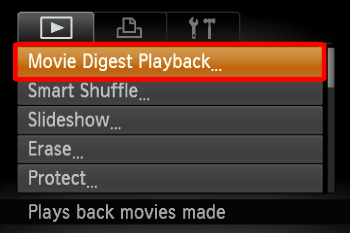
[Playback Menu] ( ) tab > Select [Movie Digest Playback]
) tab > Select [Movie Digest Playback]After the settings are completed, press the <FUNC./SET> () button.
) button.4. The following screen appears.

Operate the <directional button> up or down to select the date of the movie that you wish to play back.
5. Press the <FUNC./SET> button () to play back the movie.
) to play back the movie.