Time to replace the fuser unit
Giải pháp
When the fuser unit is nearing the end of its life, problems of deteriorated printing quality, such as residual images appearing on non-printed areas or toner not fixing onto paper completely or of paper coming out wrinkled, occur. In this case, it is recommended that you replace the fuser unit with a new one.
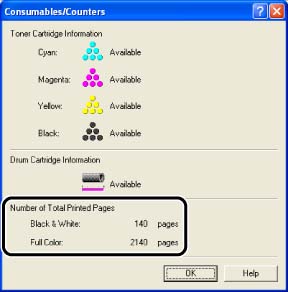
The life of the fuser unit when printing A4 size paper is approximately 50,000 pages. Check [Number of Total Printed Pages] of the printer using the following procedure. It is recommended that you replace the fuser unit if the fuser unit has reached the end of its life.
How to Check [Number of Total Printed Pages]:
NOTE
The screen shots used in this section are from Windows XP Professional.
1. Display the Printer Status Window.
2. Select [Consumables/Counters] from the [Options] menu.
You can obtain the same result by clicking  ] (Consumables/Counters) in the Printer Status Window.
] (Consumables/Counters) in the Printer Status Window.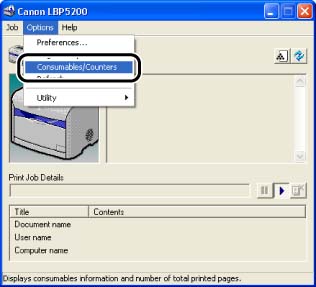
3. In the displayed dialog box, the added value of [Black and White] and [Full Color] means [Number of Total Printed Pages].