







Using Movie Digital Zoom (EOS 70D)
Giải pháp
NOTE
Icons used on this page:
[  ]: Movie shooting tab 2 / <
 >: Movie Shooting / <
 >: Start/Stop button / <
 >: Multi-controller
]: Movie shooting tab 2 / <>: Movie Shooting / < >: Start/Stop button / <>: Multi-controllerIMPORTANT
When digital zoom is set, the following conditions will apply:
- Still photo shooting is not possible.
- Since movie digital zoom processes the image digitally, the image will look rougher at higher magnifications. Noise, light spots, etc., may also become noticeable.
- When movie digital zoom is set, the scene icon will not be displayed.
- When movie digital zoom is set, the maximum ISO speed will be ISO 6400 (it cannot be expanded to H: equivalent to ISO 12800). Also, magnified view is not possible.
- the camera will focus with [FlexiZone - Single] (fixed at center).
- If you use movie digital zoom, contrast-detection AF will be used regardless of the lens used. The AF speed will therefore become slow.
- Movie Servo AF will not work.
REFERENCE
- Use a tripod to prevent camera shake.
- If you would like the exposure control to be adjusted automatically, set the camera to a shooting mode other than <M>.
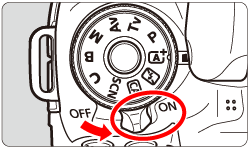
1. Set the camera's power switch to <ON>.
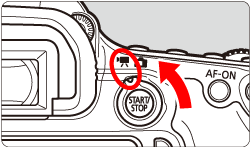
2. Set the Live View shooting/Movie shooting switch to <>.
>.The reflex mirror will make a sound, then the image will appear on the LCD monitor.
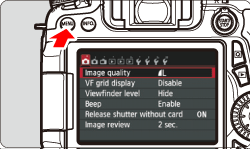
3. Press the <MENU> button to display the menu screen.
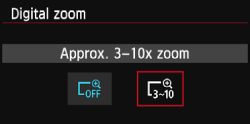
4. Under the [ ] tab, select [Digital zoom], then press < >.
>.
] tab, select [Digital zoom], then press <>.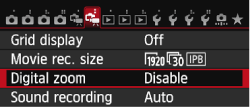
5. Select [Approx. 3-10x zoom], then press <>.
>.Press the <MENU> button to exit the menu and return to movie shooting.
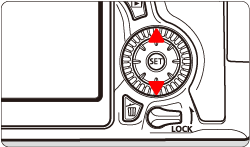
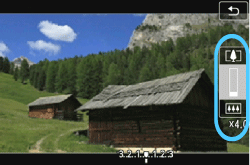
6. Press the <> button. The digital zoom bar will appear.
> button. The digital zoom bar will appear.- Press the <
 > key to zoom in or press the <
 > key to zoom out.
7. Press the <> button to start shooting a movie.
> button to start shooting a movie.- While the movie is being shot, the "
 " mark will be displayed on the upper right of the screen.
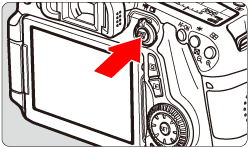
8. To stop shooting the movie, press the <> button again.
> button again.REFERENCE
- To cancel digital zoom, set [Disable] in step 4.