







Setting the White Balance (PowerShot G9 X)
Giải pháp
By adjusting white balance (WB), you can make image colors look more natural for the scene you are shooting.
IMPORTANT
- The following section explains the setting procedures when the camera’s shooting mode has been set to [Program AE] (
 ).
).
 ] are shown in the table below.
| Shooting modes in which the white balance can be set |  *1 / *1 /  / /  / /  / /  / /  *2 / *2 /  *2 / *2 /  *2 / *2 /  *2 *2 |
*2:
 is not available.
- White balance setting procedures are explained below.
1. Press the power button to turn the camera on.
2. Press the < > button to display the menu setting screen.
> button to display the menu setting screen.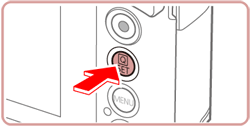
3. Touch ( ) on the right side of the screen. (If the settings have not been changed, [ ] will be displayed.)
) on the right side of the screen. (If the settings have not been changed, [ ] will be displayed.)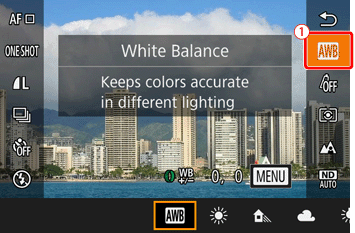
4. Slide your finger right or left to choose the desired mode icon from the options displayed on the bottom of the screen.

- For more information on white balance settings, please refer to the table below.
| Icon | Mode |
| Auto | Automatically sets the optimal white balance for the shooting conditions. |
 Day Light Day Light | For shooting outdoors in fair weather. |
 Shade Shade | For shooting in the shade. |
 Cloudy Cloudy | For shooting in cloudy weather or at twilight. |
 Tungsten Tungsten | For shooting under ordinary incandescent lighting. |
 Fluorescent Fluorescent | For shooting under white fluorescent lighting. |
 Fluorescent H Fluorescent H | For shooting under daylight fluorescent lighting. |
 Flash Flash | For shooting with the flash. |
 , , Custom Custom | For manually setting a custom white balance. |
5. Press the <> button to complete the setting.
> button to complete the setting.6. The procedure is complete when the icon for the setting you selected is displayed on the screen.

REFERENCE
 (Custom White Balance) For image colors that look natural under the light in your shot, adjust white balance to suit the light source where you are shooting. Set the white balance under the same light source that will illuminate your shot. For more information, please refer to the camera's instruction manual.