







Customizing Controls (Assigning Different Functions to Controls) (EOS 80D)
Giải pháp
NOTE
Icons in this Article
[  ]: Custom Functions tab / <
 >: Erase button
]: Custom Functions tab / <>: Erase button1. Set the camera's power switch to <ON>.
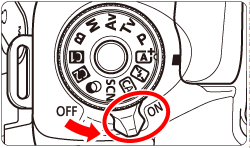
2. Set the camera's Mode Dial to a Creative Zone mode.
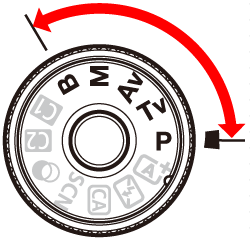
NOTE
Controls cannot be customized in "Basic Zone Modes". Set the Mode Dial to a Creative Zone mode to customize controls. The current camera settings can also be registered to <C1/C2> on the Mode Dial.
3. Press the <MENU> button to display the menu.
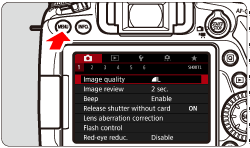
4. Under the [ ] tab, select [C.Fn III: Operation/Others], then press < >.
>.
] tab, select [C.Fn III: Operation/Others], then press <>.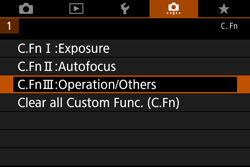
5. Select [4: Custom Controls], then press the <> button.
> button.The Custom Controls screen will appear.
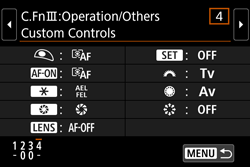
6. Select a camera button or dial, then press the <> button.
> button.The name of the camera control and the assignable functions will be displayed. The location of the camera control can be checked in the illustration on the left side of the screen.
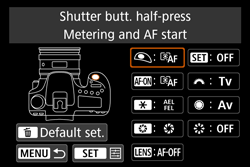
7. Select a function, then press the <> button.
> button.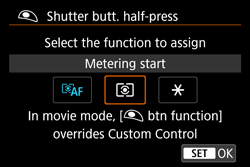
8. When you press the <> button to exit the setting, the screen in step 6 will reappear.
> button to exit the setting, the screen in step 6 will reappear.Press the <MENU> button to exit.
NOTE
With the screen in step 6 displayed, you can press the <> button to cancel the Custom Control settings.
> button to cancel the Custom Control settings.Note that the [ C.Fn III-4: Custom Controls ] settings will not be canceled even if you select [ : Clear all Custom Func. (C.Fn)].
C.Fn III-4: Custom Controls ] settings will not be canceled even if you select [ : Clear all Custom Func. (C.Fn)].Assignable Functions to Camera Controls
* The AF stop button [  ] is provided only on super telephoto IS lenses.
| Function |  |  |  |  | * |  |  |  |  | ||
| AF |  | Metering and AF start |  | | | | |||||
 | AF stop | | | | | ||||||
 | ONE SHOT  AI SERVO/SERVO AI SERVO/SERVO | | | ||||||||
 | AF point direct selection | | |||||||||
| Exposure |  | Metering start | | ||||||||
 | AE lock/FE lock | | | | | ||||||
 | AE lock | | | | | ||||||
| AE lock (while button pressed) | | |||||||||
 | AE lock (hold) | | | | | ||||||
 | FE lock | | | | | ||||||
 | Set ISO Speed (hold button, turn [ ]) | | |||||||||
 | Exposure Compensation (hold button, turn [ ]) | | |||||||||
 | Shutter speed setting in M mode | | | ||||||||
 | Aperture setting in M mode | | | ||||||||
| Function | | | | | * | | | | | ||
| Flash |  | Flash exposure compensation | | ||||||||
 | Flash function settings | | |||||||||
| Images |  | Image quality | | ||||||||
 | Picture Style | | |||||||||
 | White balance selection | | |||||||||
| Operation | | Depth-of-field preview | | ||||||||
 | IS start | | | ||||||||
 | Menu display | | |||||||||
 | No function (disabled) | | | | | | |||||
] is provided only on super telephoto IS lenses.