




How to Turn Off the [Demo Mode] Setting (VIXIA HF G20 / LEGRIA HF G25)
Solution
The demonstration mode [Demo Mode] displays the camcorder’s main features. It starts automatically when the camcorder is powered with the compact power adapter if you leave it turned on without a memory card for more than 5 minutes.
The procedure for turning the [Demo Mode] setting off is explained below.
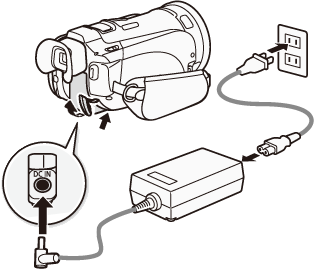
1. Connect the compact power adapter to the camcorder.
NOTE
If a memory card is inserted, remove it before continuing.
2. Set the mode switch to <M> or <CINEMA>.
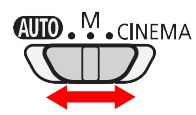
3. Turn on the camcorder and make sure it is set to a recording mode.
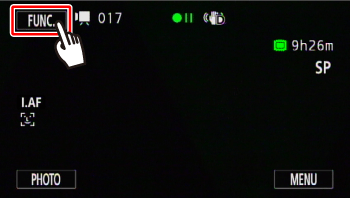
4. Touch [  ].
].
].
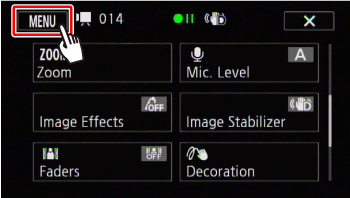
5. Touch [  ].
].
].
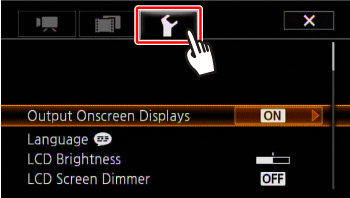
6. Touch [  ].
].
].
7.  Drag your finger up or down to bring [Demo Mode] into the orange selection bar, and then
  touch the orange frame on the right.
Drag your finger up or down to bring [Demo Mode] into the orange selection bar, and then touch the orange frame on the right.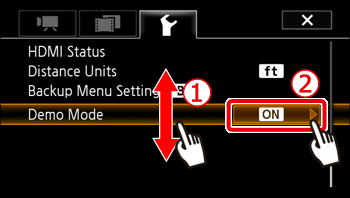
8. Touch [OFF].
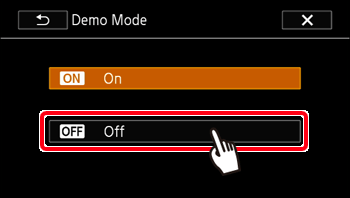
This concludes the procedure for turning off the [Demo Mode] setting.