




Restoring the camera’s default settings (EOS 6D (Wi-Fi Model))
Giải pháp
You can restore the default settings of shooting functions and menu functions.
1. Set the power switch to <ON>.
2. Press the <MENU> button to display the menu screen.
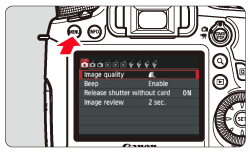
3. Under the [  ] tab, select [Clear all camera settings], then press <SET>.
] tab, select [Clear all camera settings], then press <SET>.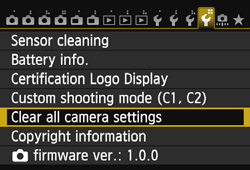
4. Select [OK], then press <SET>.
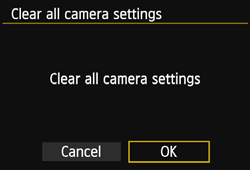
Setting [Clear all camera settings] will reset the camera to the following default settings:
| Shooting Settings | |||
|---|---|---|---|
| AF operation | One-Shot AF | Exposure compensation/AEB | 0 |
| AF point selection | Automatic selection | Flash exposure compensation | 0 (Zero) |
| Metering mode |  (Evaluative metering) (Evaluative metering) | Multiple exposure | Disable |
| ISO speed | Auto | HDR Mode | Disable HDR |
| ISO speed range | Minimum limit: 100 Maximum limit: 25600 | Mirror lockup | Disable |
| Auto ISO range | Minimum limit: 100 Maximum limit: 12800 | Custom Functions | Unchanged*1 |
| ISO Auto minimum shutter speed | Auto | Flash function settings | Unchanged*1 |
| Drive mode |  (Single shooting) (Single shooting) | ||
| Image-recording Settings | |||
|---|---|---|---|
| Image quality |  | White balance bracketing | ±0 |
| Picture Style | Auto | Color space | sRGB |
| Auto Lighting Optimizer | Standard | Long exposure noise reduction | Disable |
| Peripheral illumination correction | Enable/ Correction data retained | High ISO speed noise reduction | Standard |
| Chromatic aberration correction | Enable/ Correction data retained | Highlight tone priority | Disable |
| White balance |  (Auto) (Auto) | File numbering | Continuous |
| Custom White Balance | Canceled*2 | Auto cleaning | Enable |
| White balance correction | 0.0 | Dust Delete Data | Erase |
| Camera Settings | |||
|---|---|---|---|
| Auto power off | 1 min. | LCD off/on button | Remains on |
| Beep | Enable | Date/Time/Zone | Unchanged*1 |
| Release shutter without card | Enable | Language | Unchanged*1 |
| Image review | 2 sec. | Video system | Unchanged*1 |
| Highlight alert | Disable | Feature guide | Enable |
| AF point display | Disable | INFO. button display options | All items selected |
| Playback grid | Off | Custom shooting mode | Unchanged*1 |
| Histogram display | Brightness | Copyright information | Unchanged*1 |
| Magnification (Approx.) | 2x | Eye-Fi transmission | Disable |
| Control over HDMI | Disable | My Menu settings | Unchanged*1 |
Image jump w/ |  (10 images) (10 images) |
Display from My Menu | Disable |
| Auto rotate | On  |
GPS | Disable |
| LCD brightness |  |
Wi-Fi | Disable |
| Live View Shooting Settings | |||
|---|---|---|---|
| Live View shooting | Enable | Exposure simulation | Enable |
| AF method | FlexiZone - Single | Silent LV shooting | Mode 1 |
| Grid display | Off | Metering timer | 16 sec. |
| Aspect ratio | 3:2 | ||
| Movie Shooting Settings | |||
|---|---|---|---|
| AF method | FlexiZone - Single | Time code | |
| Silent LV shooting | Mode 1 | Count up | Unchanged*1 |
| Metering timer | 16 sec. | Start time setting | Unchanged*1 |
| Grid display | Off | Movie recording count | Unchanged*1 |
| Movie recording size | 1920x1080/IPB | Movie playback count | Unchanged*1 |
| Sound recording | Auto | Drop frame | Unchanged*1 |
| Video snapshot | Disable | ||
*1: The setting is maintained.
*2: The image is deselected.