







How do I display shooting information during playback? (EOS REBEL T5/EOS 1200D)
Giải pháp
When you press the < > (Playback) button, the last captured image or last image played back will appear.
> (Playback) button, the last captured image or last image played back will appear.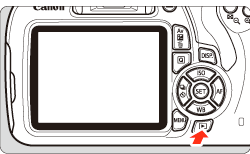
You can change the information displayed by pressing the <DISP.> button.
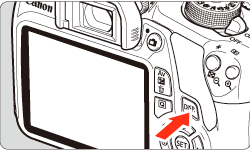
 Each time you press the <DISP.> button, the display format will change.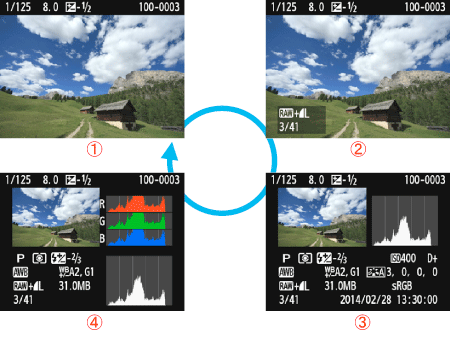
 With basic information
 Basic information + Image quality/Playback number
 Shooting information display
 Histogram
The most detailed shooting information is shown below.
<Sample Still Photo Taken in a Creative Zone Mode>
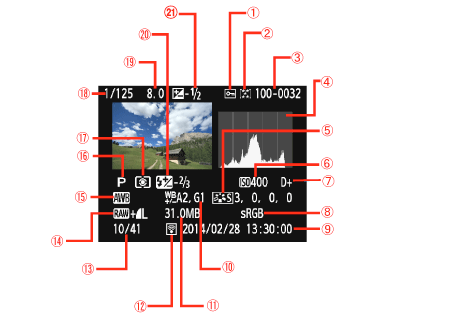
| Protect images |  | Eye-Fi transfer |
| Rating |  | Playback number/ Total images recorded |
| Folder number - File number |  | Image-recording quality |
| Histogram (Brightness/RGB) |  | White balance |
 | Picture Style/Settings |  | Shooting mode |
 | ISO speed |  | Metering mode |
 | Highlight tone priority |  | Shutter speed |
 | Color space |  | Aperture |
 | Shooting date and time |  | Flash exposure compensation amount |
 | White balance correction |  | Exposure compensation amount |
 | File size |
* With  +
+  images, the file size is displayed.
+ images, the file size is displayed.* For still photos taken during movie shooting, < > will be displayed.
> will be displayed.* If a Creative filter or Resize has been applied to the image, the < +> icon will change to < >.
>.
+> icon will change to <>.* Images taken with flash without any flash exposure compensation are marked with the < > icon. Images taken with flash exposure compensation are marked with the <
 > icon.
> icon. Images taken with flash exposure compensation are marked with the <> icon.