




Preventing the flash from firing (PowerShot SX60 HS / PowerShot G7 X)
Giải pháp
To prevent the flash from firing during shooting, please set it to [Off]  using the procedure explained below.
using the procedure explained below.IMPORTANT
- The position and shape of the operation buttons, screens displayed, and setting items may differ according to the model you use.
- The flash cannot be turned off in the [Star Portrait] (
 ) mode of PowerShot G7 X models.
The flash will automatically be set to [Off] ( ) when it is lowered.
) when it is lowered.1. Press the <Power> button to turn the camera on.
2. Press the <Flash> ( ) button.
) button.
3. Press the < ><
>< > buttons to choose [Off] .
><> buttons to choose [Off] .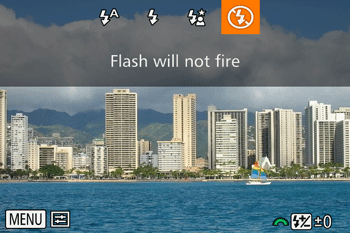
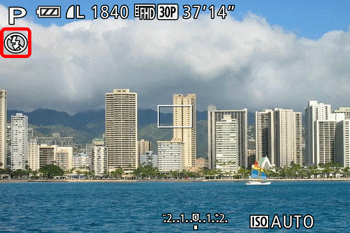
4. After the setting has been changed, the icon shown in the example image below is displayed.