





Turning off the red lamp (AF assist beam) when shooting in dimly lit locations (EOS M3)
Giải pháp
Under low-light conditions, when you press the shutter button halfway, the AF-assist lamp may be illuminated. It illuminates the subject to enable easier autofocusing.

NOTE
- The AF assist beam can only be turned off when the camera is set to one of the following modes:
-[  ], [
], [  ], [
], [  ], [
], [  ], [
], [  ], [
], [  ], [
], [  ]
]
], [ ], [ ], [ ], [ ], [ ], [ ]- In [
 ], and [
  ] mode, the AF Beam is set to [1: Disable] and cannot be changed.
The procedure for turning off the AF assist beam is explained below.
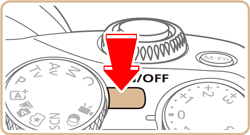
1. Set the camera’s power to [ON].
2. Set the mode dial to [ ], [ ], [ ], [ ], [ ], or [ ].
], [ ], [ ], [ ], [ ], or [ ].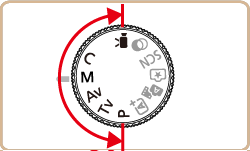
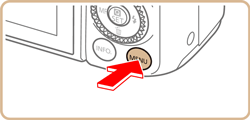
3. Press the [MENU] button to display the menu screen.
4. Press the [  ], [
], [  ] buttons or turn the [
  ] dial to select the [
  - 1] tab.
], [ ] buttons or turn the [ ] dial to select the [ - 1] tab.Press the [  ], [
], [  ] buttons or turn the [
  ] dial to choose [C.Fn II: AF], and then press the [
  ] button.
], [ ] buttons or turn the [ ] dial to choose [C.Fn II: AF], and then press the [ ] button.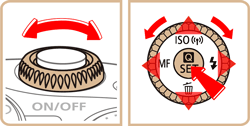

5. Press the [ ], [ ] buttons or turn the [ ] dial to choose [1: Disable], and then press the [ ] button.
], [ ] buttons or turn the [ ] dial to choose [1: Disable], and then press the [ ] button.・ At the bottom of the screen, the current Custom Function settings are indicated below the respective function numbers.
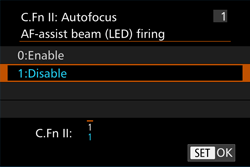
6. Press the [MENU] button to return to the shooting screen.
NOTE
To make auto focusing in dimly lit places easier, set the [AF-assist beam (LED) firing] to [0:Enable].